

Staying productive while studying can feel difficult when distractions are everywhere. Whether you are preparing for competitive exams, completing assignments, coding, reading research papers, or working remotely, maintaining focus for long periods is challenging. That is where a Pomodoro Timer Study Planner becomes useful.
The Pomodoro technique is one of the most effective time-management methods used by students, professionals, writers, developers, and creators worldwide. Instead of forcing yourself to work continuously for hours, this method divides your work into focused intervals followed by short breaks. This structure improves concentration, reduces mental fatigue, and helps you complete tasks faster.
Our Pomodoro Timer Study Planner is designed to help you organize study tasks, track completed sessions, manage break cycles, and maintain better productivity habits.
Table of Contents
What Is a Pomodoro Timer Study Planner?
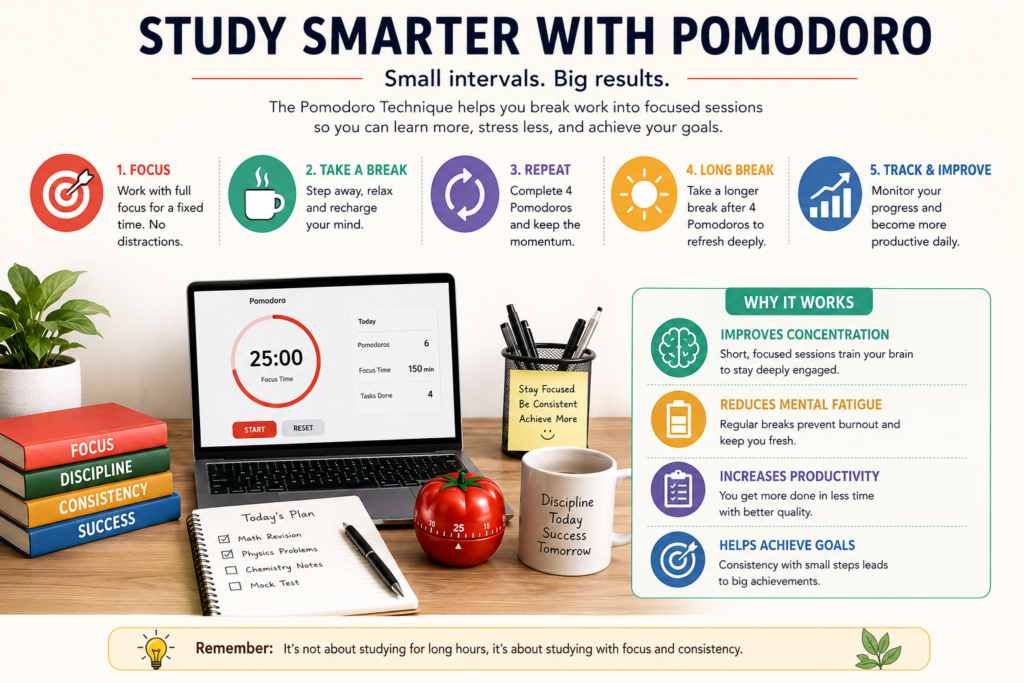
A Pomodoro Timer Study Planner is a productivity tool based on the famous Pomodoro Technique developed by Francesco Cirillo. The concept is simple:
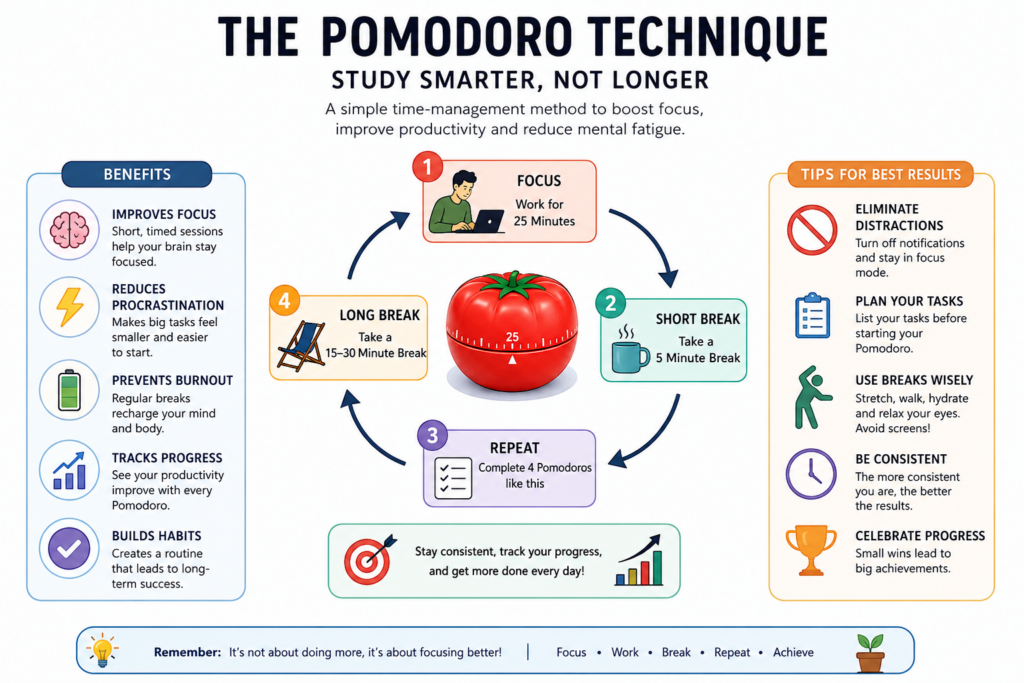
- Work for a fixed amount of time (usually 25 minutes)
- Take a short break (usually 5 minutes)
- Repeat the cycle
- After several cycles, take a longer break
Each work session is called a “Pomodoro.”
The goal is to improve focus without overwhelming your brain. Instead of procrastinating because a task feels too large, you work in smaller, manageable intervals.
This calculator combines:
- A customizable Pomodoro study timer
- Break management
- Task planning
- Productivity tracking
- Session monitoring
Benefits of Using a Pomodoro Study Timer
Using a Pomodoro study timer regularly can improve both productivity and mental clarity.
1. Better Concentration
Working in short intervals helps your brain stay engaged without feeling exhausted. Since you know a break is coming soon, it becomes easier to avoid distractions.
2. Reduced Procrastination
Large tasks often feel intimidating. Breaking them into smaller timed sessions makes them easier to start.
3. Improved Time Management
A study session planner helps you estimate how long tasks actually take, making scheduling more realistic.
4. Less Burnout
Continuous studying without breaks reduces retention and increases fatigue. The Pomodoro method balances productivity with recovery.
5. Better Task Tracking
You can monitor completed sessions, finished tasks, and total study minutes to understand your daily productivity.
How This Pomodoro Timer Study Planner Works
This productivity tool includes multiple useful features:
Custom Work & Break Durations
You can modify:
- Pomodoro duration
- Short break duration
- Long break duration
This flexibility helps different types of learners and professionals.
Task Planner
Add study or work tasks directly inside the planner and mark them completed once done.
Productivity Statistics
Track:
- Total Pomodoros completed
- Total focused minutes
- Tasks completed
Audio Notifications
The timer alerts you when sessions end so you can switch between focus mode and breaks easily.
Mobile-Friendly Design
The timer works smoothly on desktops, tablets, and smartphones.
Steps to Use This Calculator
Using the Pomodoro Timer Study Planner is simple.
Step 1: Add Your Tasks
Enter the tasks you want to complete in the task planner section.
Example:
- Revise Physics Chapter 5
- Finish Python assignment
- Practice mock test questions
Step 2: Adjust Timer Settings
Customize:
- Pomodoro duration
- Short break time
- Long break time
Recommended settings:
- Focus session: 25 minutes
- Short break: 5 minutes
- Long break: 15 minutes
Step 3: Start the Timer
Click the “Start” button to begin your focus session.
During this period:
- Avoid social media
- Turn off notifications
- Focus only on one task
Step 4: Take Short Breaks
When the session ends:
- Stretch
- Drink water
- Walk briefly
- Relax your eyes
Avoid opening distracting apps during breaks.
Step 5: Repeat the Cycle
Continue multiple Pomodoro cycles until your tasks are complete.
After every 4 Pomodoros, take a longer break to recharge.
Example of a Pomodoro Study Schedule
Here is a simple example of how a student can use the focus timer online effectively.
| Session | Activity | Duration |
|---|---|---|
| Pomodoro 1 | Mathematics Revision | 25 min |
| Short Break | Relax | 5 min |
| Pomodoro 2 | Solve Practice Questions | 25 min |
| Short Break | Walk | 5 min |
| Pomodoro 3 | Science Reading | 25 min |
| Short Break | Hydrate | 5 min |
| Pomodoro 4 | Mock Test | 25 min |
| Long Break | Refresh | 15 min |
This structure prevents mental exhaustion while improving consistency.
Who Should Use a Productivity Timer for Students?
A productivity timer for students is useful for many people beyond academics.
Students
Ideal for:
- Exam preparation
- Homework planning
- Revision schedules
- Online learning
Developers & Programmers
Helps maintain deep focus while coding and debugging.
Writers & Content Creators
Useful for drafting articles, scripts, or editing content.
Remote Workers
Encourages structured workflows and reduces distractions at home.
Competitive Exam Aspirants
Great for UPSC, NEET, JEE, SSC, banking exams, and certification studies.
Best Pomodoro Duration for Studying
There is no universal rule. Different people prefer different focus intervals.
Standard Method
- 25-minute work sessions
- 5-minute short breaks
Deep Work Sessions
Advanced learners sometimes use:
- 45-minute focus sessions
- 10-minute breaks
Beginner-Friendly Sessions
If concentration is difficult:
- 15-minute sessions
- 3-minute breaks
The best method is the one you can maintain consistently.
Tips to Get Better Results With the Pomodoro Technique
Remove Distractions
Keep your phone away or enable focus mode.
Use One Task Per Session
Multitasking reduces productivity.
Track Progress Daily
Review completed Pomodoros to measure improvement.
Use Breaks Properly
Do not spend breaks scrolling endlessly on social media.
Start Small
Even completing 2–3 Pomodoros daily builds discipline.
Why the Pomodoro Technique Works
The human brain struggles with prolonged concentration. Research suggests that structured intervals improve:
- Attention span
- Mental endurance
- Information retention
- Motivation
Short deadlines also create a sense of urgency, which helps reduce procrastination.
By turning work into manageable blocks, the Pomodoro system makes difficult tasks feel easier.
Pomodoro Technique vs Traditional Studying
| Traditional Studying | Pomodoro Method |
|---|---|
| Long unstructured sessions | Structured focus intervals |
| Higher mental fatigue | Regular recovery breaks |
| Easier distraction | Better concentration |
| Poor time tracking | Clear productivity tracking |
| Harder to maintain consistency | Easier daily routine |
Common Mistakes to Avoid
Ignoring Breaks
Breaks are part of the productivity system. Skipping them leads to burnout.
Using Extremely Long Sessions
Working continuously for hours reduces efficiency.
Checking Notifications
Even small interruptions hurt concentration.
Overloading Tasks
Keep task lists realistic and manageable.
Not Reviewing Progress
Tracking improvement increases motivation.
How Many Pomodoros Should You Complete Daily?
The ideal number depends on your workload.
| User Type | Recommended Daily Pomodoros |
|---|---|
| School Students | 4–6 |
| College Students | 6–10 |
| Competitive Exam Aspirants | 8–12 |
| Office Professionals | 6–8 |
| Freelancers | 5–9 |
Quality matters more than quantity.
Can the Pomodoro Method Improve Memory?
Yes. Focused study intervals improve:
- Information retention
- Active recall
- Reduced cognitive overload
- Better revision habits
When combined with spaced repetition and practice testing, Pomodoro sessions become highly effective for learning.
Using the Study Session Planner for Exam Preparation
A study session planner helps organize preparation efficiently.
Example exam schedule:
Morning
- 3 Pomodoros for theory revision
Afternoon
- 2 Pomodoros for problem solving
Evening
- 2 Pomodoros for mock tests
This structure keeps preparation balanced and sustainable.
Why Students Prefer Online Focus Timers
A focus timer online offers advantages over traditional clocks or phone timers.
Benefits include:
- Automatic session switching
- Productivity tracking
- Visual progress indicators
- Task management
- Easy customization
This creates a more engaging and organized workflow.
Frequently Asked Questions (FAQ)
What is the ideal Pomodoro timer duration?
The standard duration is:
25 minutes work
5 minutes break
However, you can customize the timer based on your focus level.
Is the Pomodoro technique scientifically effective?
Yes. Time-blocking and structured breaks are widely used productivity strategies that improve focus and reduce mental fatigue.
Can I use this Pomodoro timer for office work?
Absolutely. It works well for:
Coding
Writing
Meetings
Research
Remote work
Creative tasks
How many Pomodoros equal one hour?
Two standard Pomodoro sessions plus one short break equal approximately one hour.
Should I pause the timer during interruptions?
Yes. If interrupted, pause the session and resume once focused again.
Is this calculator mobile-friendly?
Yes. The calculator works on smartphones, tablets, and desktop devices.
Can I customize break durations?
Yes. You can adjust both short and long break timings.
Does the Pomodoro method help reduce procrastination?
Yes. Since tasks are divided into smaller sessions, they feel easier to begin and complete.
Reference Links
- Pomodoro Technique Official Website
- Time Management Research – Mind Tools
- Productivity and Focus Study – Verywell Mind
Disclaimer
This Pomodoro Timer Study Planner is intended for educational and productivity purposes only. Productivity methods may work differently for each individual. Users should customize session durations and study routines according to their personal learning style, health requirements, and workload preferences.
Final Thoughts
A well-designed Pomodoro Timer Study Planner can completely change the way you work and study. Instead of feeling overwhelmed by large tasks, you focus on one manageable session at a time.
Whether you are preparing for exams, managing assignments, coding projects, research work, or professional tasks, using a structured productivity timer for students can help improve consistency and concentration.
The secret is not studying longer — it is studying smarter.