AI Tone Analyzer
Analyze emotion, intent, professionalism, confidence and communication style.
Enter at least a few words and click Analyze Tone.
Tone Analyzer Tool: Analyze the Tone of Your Text
Have you ever written an email, message, social media post, customer reply, or professional response and wondered, “How does this actually sound to the other person?”
That question matters more than most people realize.
A sentence can look perfectly normal to the person writing it but come across as rude, aggressive, uncertain, passive-aggressive, overly formal, or even uninterested to someone reading it. The problem becomes even more noticeable in digital communication because the reader cannot hear your voice, see your facial expression, or understand your body language.
That is where a Tone Analyzer Tool can help.
Our free Tone Analyzer lets you paste your text and examine different aspects of its communication style, including sentiment, professionalism, confidence, politeness, assertiveness, empathy, urgency, emotional intensity, directness, readability, and other language signals.
The goal is not to tell you exactly what you should write. Instead, it gives you another perspective on how your words may be interpreted.
Table of Contents
What Is a Tone Analyzer Tool?
A Tone Analyzer Tool is a text analysis tool designed to identify the emotional and communication characteristics present in written language.
When you write something, the meaning is not determined only by the dictionary definition of each word. Word choice, sentence structure, punctuation, capitalization, formality, and context can all affect how the message feels to the reader.
For example, compare these two messages:
“Send me the report today.”
and:
“Could you please send me the report today? I’d appreciate it.”
Both messages communicate a similar request, but they create very different impressions.
The first version is direct and potentially forceful. The second version is more courteous and collaborative.
A tone analysis tool looks for these types of signals and provides an overall picture of the language being used.
Modern natural-language-processing systems can separately analyze concepts such as sentiment, tone, and emotion. For example, IBM's natural-language-processing documentation distinguishes sentiment classification from tone and emotion classification, showing how these can be treated as different aspects of text analysis.
Why Does Tone Matter in Writing?
Tone affects how people interpret your message.
This is especially important when you communicate through email, workplace messaging platforms, customer support, social media, LinkedIn, online communities, and other written channels.
In a face-to-face conversation, your voice can communicate whether you are joking, frustrated, concerned, excited, or simply being direct. Written communication removes many of those signals.
As a result, even a short sentence can be interpreted in multiple ways.
Consider:
“Okay. Send it.”
Depending on the situation, the recipient might interpret that as:
- A simple confirmation
- A frustrated response
- An impatient instruction
- A professional but very direct message
- A passive-aggressive response
Written tone is strongly influenced by the relationship between the writer and reader, the subject of the message, and the level of formality used. Purdue University's writing resources similarly emphasize that tone in emails is influenced by factors such as the relationship with the recipient and the topic.
That is why checking your tone before sending an important message can be useful.
How to Use This Tone Analyzer
Using the calculator above is straightforward.
Step 1: Enter your text
Paste or type the message you want to analyze into the text box.
You can analyze:
- Emails
- Business messages
- Customer support replies
- LinkedIn posts
- Social media captions
- Reviews
- Work messages
- Feedback
- Requests
- Apologies
- Professional correspondence
- Personal messages
Step 2: Click “Analyze Tone”
Once your text is entered, select Analyze Tone.
The calculator examines the language and generates a tone profile.
Step 3: Review the overall tone
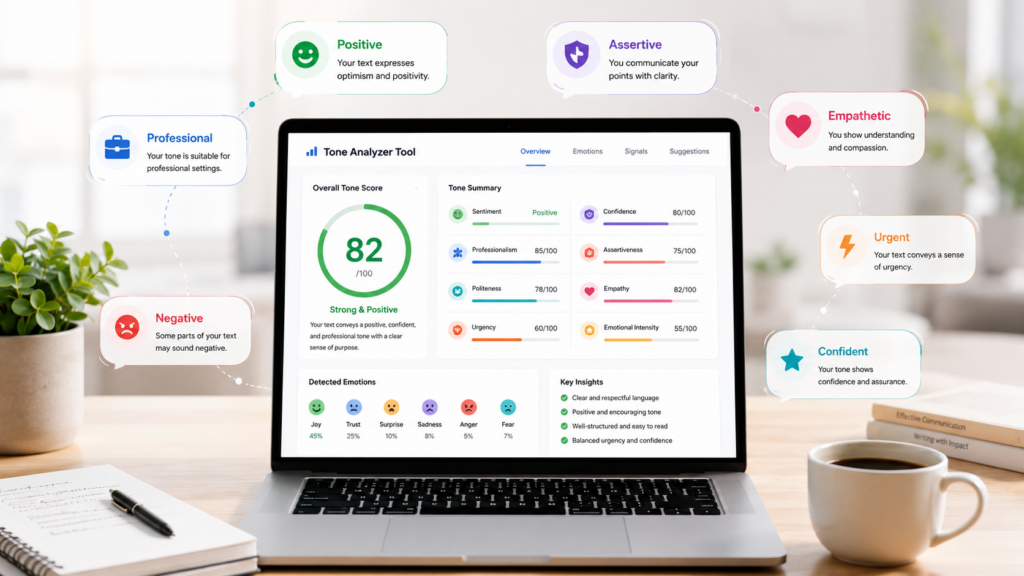
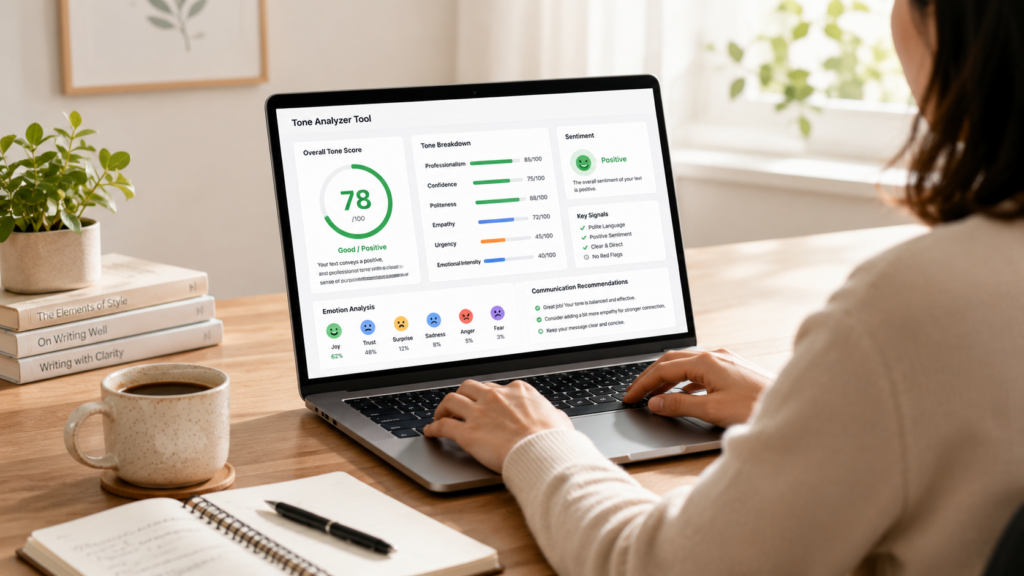
The first section gives you an overall assessment of the message.
You may see classifications such as:
- Professional / Courteous
- Positive / Warm
- Assertive / Direct
- Confident
- Empathetic
- Urgent
- Firm / Negative
- Neutral
The overall result is intended as a communication aid rather than an absolute judgment.
Step 4: Review the tone scores
The tool provides additional scores for characteristics such as:
- Professionalism
- Confidence
- Assertiveness
- Politeness
- Empathy
- Urgency
- Persuasion
- Emotional intensity
- Directness
This is useful because a message rarely has only one tone.
For example, a message can be:
85% professional + 75% assertive + 65% urgent
That tells you something different from simply labeling it “professional.”
Step 5: Check the emotion analysis
The emotion section looks for signals associated with emotions such as:
- Joy
- Anger
- Sadness
- Fear
- Trust
- Surprise
This can help identify whether your message contains stronger emotional language than you intended.
Step 6: Review detected signals
The tool also highlights language patterns that may affect the reader's perception.
For example, it can identify:
- ALL CAPS
- Repeated punctuation
- Excessive urgency
- Hedging
- Potentially confrontational wording
- Multiple questions
- Long sentences
- Readability concerns
Step 7: Read the recommendations
Finally, review the recommendations.
These suggestions can help you decide whether the message should be:
- Softer
- More professional
- More direct
- Less emotional
- More confident
- More concise
- More polite
You can then edit your original message manually.
What Does a Tone Analyzer Actually Measure?
Tone is not a single measurement.
A useful Tone Checker should ideally consider several dimensions of communication.
1. Professionalism
Professionalism describes how appropriate your language may be for a workplace or formal setting.
For example:
“Hey, can you fix this ASAP?”
is more casual than:
“Could you please review this issue and provide an update at your earliest convenience?”
Neither sentence is automatically better. The appropriate choice depends on your audience and situation.
2. Confidence
Confidence refers to how certain and decisive your language sounds.
Compare:
“I think this might possibly work.”
with:
“This approach should work.”
The first statement contains multiple uncertainty signals. The second communicates a stronger position.
However, excessive confidence can also become a problem if the statement is unsupported.
Good communication usually balances confidence with accuracy.
3. Assertiveness
Assertiveness is different from aggression.
An assertive message communicates what you need clearly without unnecessarily attacking or disrespecting another person.
For example:
“Please send the revised document by 5 PM so we can complete the review.”
is direct and assertive.
An aggressive alternative might be:
“Send the document immediately. I've already asked you several times.”
The second sentence adds emotional pressure.
4. Politeness
Politeness looks at language that acknowledges the recipient and reduces unnecessary friction.
Words and phrases such as:
- Please
- Thank you
- I appreciate it
- Could you
- Would you
- If possible
- Sorry
- I understand
can influence the perceived tone of a message.
Politeness does not mean every sentence needs to contain “please.” Overusing polite language can sometimes make writing unnecessarily wordy.
5. Empathy
Empathy is particularly important in customer service, management, complaints, apologies, and difficult conversations.
Compare:
“That isn't our problem.”
with:
“I understand why this situation is frustrating. Let me see what we can do to help.”
The second response acknowledges the other person's experience before moving toward a solution.
6. Urgency
Words such as “urgent,” “immediately,” “ASAP,” “critical,” and “deadline” can increase the perceived urgency of a message.
Urgency is useful when something genuinely requires immediate attention.
But if every request is described as urgent, people may eventually stop treating the word as meaningful.
7. Emotional Intensity
Some messages contain strong emotional language.
For example:
“This is completely unacceptable!!!”
has substantially more emotional intensity than:
“There appears to be an issue with the current process.”
Neither is automatically correct. The appropriate level depends on the circumstances.
8. Directness
Direct communication makes the requested action or intended point easy to identify.
For example:
“Please review the attached document and confirm whether it is approved.”
is highly specific.
A less direct version might be:
“I was wondering if you might have some time to perhaps take a look at the document.”
The second version is softer but less efficient.
Tone Analyzer vs. Sentiment Analyzer
These terms are often used interchangeably, but they are not exactly the same.
A sentiment analyzer generally focuses on whether text is positive, negative, or neutral.
For example:
“I love this product.”
would generally have positive sentiment.
“The service was terrible.”
would generally have negative sentiment.
“The meeting is scheduled for Monday.”
would generally be neutral.
Tone is broader.
A message can have neutral sentiment while still being:
- Formal
- Assertive
- Professional
- Urgent
- Confident
- Cold
- Diplomatic
This distinction is important when you want to Analyze Tone of Text rather than simply determine whether the text is positive or negative.
IBM's natural-language-processing documentation describes sentiment as positive, neutral, or negative, while separate models can classify tone and emotion.
Examples of Tone Analysis
Let's look at a few practical examples.
Example 1: Workplace Email
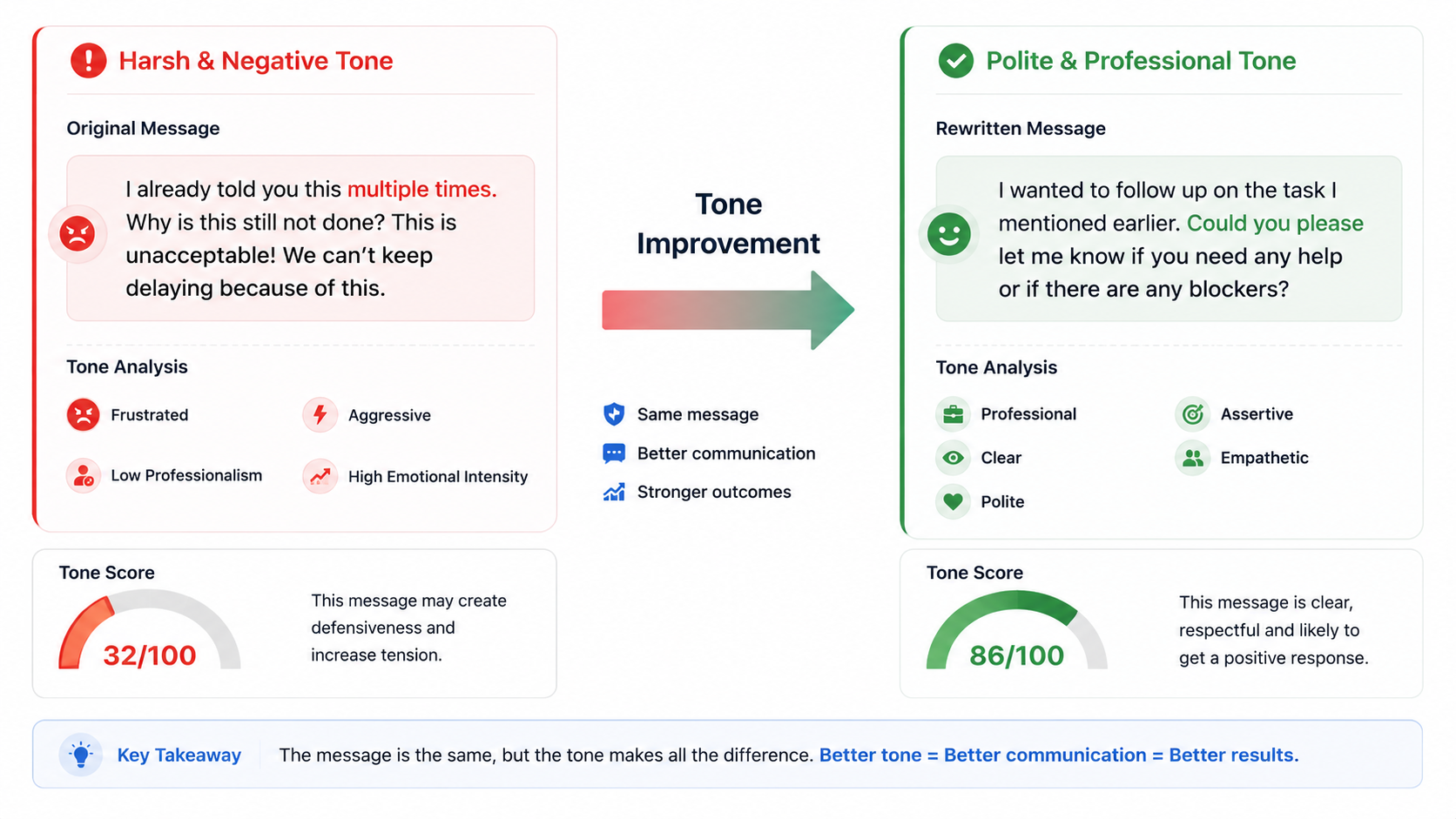
Original:
“I have already sent this twice. Please check your email before asking me again.”
The message is clear, but it may sound frustrated or confrontational.
Potential signals include:
- High directness
- Higher assertiveness
- Lower perceived politeness
- Frustration
- Professional risk
A softer alternative could be:
“I believe I sent this earlier, but I’m happy to resend it here for convenience. Please let me know if you still cannot access it.”
The second version preserves the objective while reducing unnecessary friction.
Example 2: Customer Support
Original:
“Your request has been rejected. There is nothing we can do.”
This is concise but potentially cold.
A more empathetic version might be:
“Unfortunately, we’re unable to approve the request under the current policy. I understand this may be disappointing, and I’d be happy to explain the available alternatives.”
The information has not changed dramatically, but the communication style has.
Example 3: Professional Request
Original:
“Send me the numbers before the meeting.”
This is direct but may sound demanding.
Alternative:
“Could you please send me the latest numbers before the meeting? I’d like to review them beforehand.”
The second message communicates the same requirement while giving the recipient additional context.
Example 4: LinkedIn Post
Consider:
“We are excited to announce that our team has successfully completed the project. Thank you to everyone who contributed.”
This would likely contain signals associated with:
- Positive sentiment
- Joy
- Confidence
- Professionalism
- Appreciation
That combination is generally suitable for an achievement-oriented professional post.
When Should You Use a Tone Checker?
A Tone Checker can be especially useful before sending communication where the consequences of misunderstanding are higher.
Before sending an important email
If an email involves disagreement, escalation, deadlines, performance feedback, or a sensitive topic, checking the tone can help you spot language that might sound harsher than intended.
Before responding to a customer
Customer communication requires a balance between professionalism, empathy, clarity, and efficiency.
Before publishing on LinkedIn
Professional social media posts are public, so wording matters.
A sentence that sounds fine in a private conversation can look different when published publicly.
Before sending workplace messages
Short messages often create more ambiguity than longer emails because there is less context.
Before writing feedback
Feedback should generally focus on the issue rather than attacking the person.
Purdue University's writing guidance also notes that written feedback can easily be interpreted as criticism and recommends framing comments around the reader's response rather than making them personal.
How to Improve the Tone of Your Writing
A tone analyzer can identify potential issues, but improving your writing still requires judgment.
Here are some practical techniques.
Use specific language
Instead of:
“This is wrong.”
Try:
“There appears to be an issue with the calculation in this section.”
The second version identifies the problem without making the statement unnecessarily personal.
Explain what you need
Compare:
“Please fix this.”
with:
“Please update the figures in sections two and three before the final review.”
Specific requests are easier to act on.
Avoid unnecessary emotional language
If you are frustrated, it can be tempting to write exactly how you feel.
Before sending the message, remove words that do not contribute to the outcome.
For example:
“This is absolutely ridiculous and I cannot believe this happened again.”
could become:
“This issue has occurred again and is affecting the timeline. Please investigate the cause and provide an update.”
The second version is easier to act on.
Be careful with ALL CAPS
Capital letters can make written communication appear louder or more aggressive.
For example:
“PLEASE SEND THIS TODAY.”
has a different visual impact from:
“Please send this today.”
Capitalization is not inherently bad, but it should be intentional.
Watch your punctuation
Multiple exclamation marks can increase emotional intensity.
For example:
“Why is this still pending?!”
can feel confrontational.
A more neutral alternative:
“Could you please let me know why this is still pending?”
Reduce excessive hedging
Words such as:
- Maybe
- Perhaps
- I think
- Possibly
- It seems
- Might
- Could
can be useful when uncertainty is genuine.
But using too many of them can make confident ideas sound uncertain.
Why Context Still Matters
No automated Tone Analyzer can perfectly understand every message.
The same sentence can have completely different meanings depending on context.
For example:
“Nice job.”
could be sincere praise.
But it could also be sarcasm.
A machine analyzing the words alone may struggle to understand that difference without additional context.
Tone can also depend on:
- Relationship between sender and recipient
- Cultural expectations
- Industry
- Previous conversations
- Personal communication style
- Subject matter
- Timing
- Sarcasm
- Humor
- Shared experiences
This is one reason a tone score should be treated as an indicator rather than an objective measurement of what another person will definitely think.
Research and practical NLP systems also show that sentiment and tone classification are probabilistic rather than perfect representations of human interpretation. IBM's documentation, for example, describes model outputs in terms of classifications and confidence scores.
Can a Tone Analyzer Detect Sarcasm?
Sarcasm is one of the most difficult aspects of written communication to analyze reliably.
Consider:
“Fantastic. Another meeting.”
Without context, this could be genuine enthusiasm or sarcasm.
A human who knows the situation may immediately understand the intended meaning. A basic text analyzer may not.
For that reason, you should not treat a neutral or positive score as proof that a message cannot be interpreted sarcastically.
If sarcasm matters, read the message again from the recipient's perspective.
Ask:
“If I didn't know what I intended, how could I interpret this sentence?”
That simple test can reveal problems that an automated score cannot.
Tone Analyzer for Emails
Email is one of the most useful applications for a tone analysis tool.
Before sending an important email, check whether the message is:
- Clear
- Professional
- Polite
- Direct
- Confident
- Too emotional
- Too casual
- Too vague
- Too aggressive
This is particularly useful for emails involving:
- Managers
- Clients
- Customers
- HR
- Vendors
- Escalations
- Project delays
- Disagreements
- Requests
- Negotiations
A good email does not need to sound overly formal. It needs to sound appropriate for the recipient and situation.
Tone Analyzer for Social Media
Social media has its own communication challenges.
Posts are often short, which means individual words can carry more weight.
A sentence such as:
“People really need to learn how to do their jobs.”
may be interpreted as frustrated or insulting.
If the intention is constructive criticism, a better alternative might be:
“There are several areas where the process could be improved. Clearer documentation and training could make a significant difference.”
The second version communicates criticism without unnecessarily attacking people.
Tone Analyzer for Students and Writers
Students can also use a tone analysis tool while editing essays, assignments, reports, and applications.
For academic writing, the goal is usually to avoid unnecessarily emotional or conversational language.
For example:
“I think this is obviously a really bad idea.”
could be rewritten as:
“This approach presents several significant limitations.”
The second version is more analytical and appropriate for formal writing.
However, students should remember that automated tools should support editing rather than replace their own judgment.
Tone Analyzer for Customer Reviews
Customers often write reviews when they are particularly happy or unhappy.
A tone analysis can help identify whether a review is:
- Positive
- Negative
- Frustrated
- Satisfied
- Angry
- Appreciative
- Neutral
For businesses, analyzing these patterns across large volumes of customer feedback can help identify recurring problems.
Natural-language-processing systems can go further by analyzing sentiment toward specific targets. For example, a review could express positive sentiment about food but negative sentiment about service. IBM's targeted sentiment documentation describes this distinction.
Is This Tone Analyzer an AI?
The calculator above is designed as a lightweight, browser-based linguistic analyzer. It uses language patterns, dictionaries, scoring rules, punctuation, structure, and other signals to estimate communication characteristics.
That means it should not be treated as equivalent to a large language model or a specialized enterprise NLP model.
This distinction is important.
A sophisticated AI system can consider broader semantic context, while a rule-based analyzer can provide fast and private feedback without requiring text to be sent to an external AI service.
The advantage of a browser-based approach is simplicity and privacy: the analysis can happen locally in the visitor's browser.
Frequently Asked Questions
What is a Tone Analyzer Tool?
A Tone Analyzer Tool examines written text for communication characteristics such as sentiment, emotion, professionalism, confidence, politeness, assertiveness, urgency, and directness.
Is the Tone Analyzer free?
Yes. The calculator on this page is designed to be used as a free online tone analysis tool.
What type of text can I analyze?
You can analyze emails, messages, social media posts, reviews, customer responses, professional communication, feedback, and general written text.
Can I use a Tone Analyzer for emails?
Yes. Email is one of the most useful applications because tone can be difficult to judge when communication happens entirely through text.
Can it tell me if my message sounds rude?
It can identify language patterns associated with confrontational or negative communication. However, it cannot guarantee how another person will interpret the message because context and personal relationships matter.
Does tone analysis detect emotions?
The calculator can identify signals associated with emotions such as joy, anger, sadness, fear, trust, and surprise.
Professional NLP systems can also perform emotion classification. IBM's documentation, for example, describes emotion models that classify emotions such as anger, disgust, fear, joy, and sadness.
What is the difference between tone and sentiment?
Sentiment usually describes whether a message is positive, negative, or neutral. Tone is broader and can describe characteristics such as professionalism, confidence, politeness, urgency, or assertiveness.
Can a Tone Analyzer detect sarcasm?
Not reliably. Sarcasm depends heavily on context, shared knowledge, and intention.
Should I completely trust the tone score?
No. Use it as an editing aid rather than an absolute judgment. Read your message from the recipient's perspective before sending it.
Can I analyze a long document?
The calculator supports text analysis, but shorter sections are often easier to interpret. For very long documents, analyzing individual paragraphs or sections can provide more useful results.
Some professional NLP tone models also recommend working with shorter text segments for optimal classification. IBM's Tone model documentation, for example, notes that its model works optimally on input of no more than 1,000 characters.
Does the tool store my text?
The calculator above is designed to run locally in the browser. Its footer indicates that the entered text is not sent to an external service by the calculator itself.
You should still avoid entering confidential information into any online tool unless you understand how that particular website handles data.
Tips for Getting Better Results
For the most useful tone analysis, don't analyze only one isolated sentence if the surrounding context is important.
Instead, paste the complete message.
For example, instead of checking:
“Please fix this.”
include the surrounding explanation:
“The figures in the latest report don't match the source data. Please review the calculations and update the affected sections before the meeting.”
The second example provides more context and makes the intended communication style clearer.
Also remember that tone should match the audience.
A casual message to a close colleague does not need to sound like a legal document.
Likewise, a customer escalation probably should not sound like a casual chat.
The best tone is not necessarily the most formal tone.
The best tone is the appropriate tone for the situation.
Final Thoughts
Written communication is easy to underestimate.
A short email can affect a business relationship. A customer response can influence someone's perception of a company. A LinkedIn post can affect your professional image. A workplace message can create unnecessary conflict simply because the recipient interpreted your wording differently from how you intended it.
A Tone Analyzer Tool gives you a quick way to pause before pressing Send.
Use it to identify potential problems, examine the emotional character of your writing, and understand whether your message is coming across as professional, confident, polite, assertive, empathetic, urgent, or overly emotional.
Most importantly, don't focus on achieving a perfect score.
The objective is better communication.
If your message is clear, appropriate for the audience, respectful, and aligned with what you actually want to communicate, you are already doing the most important part.
Use the analyzer as a second pair of eyes—not as a replacement for human judgment.
References
- IBM – Tone Classification
IBM's documentation explains how NLP models can classify tones such as excited, frustrated, impolite, polite, sad, satisfied, and sympathetic.
IBM Tone Classification Documentation - IBM – Sentiment Analysis
IBM explains sentiment classification using positive, neutral, and negative categories.
IBM Sentiment Documentation - IBM – Emotion Classification
IBM's NLP documentation describes emotion classification and categories including anger, fear, joy, and sadness.
IBM Emotion Classification Documentation - Purdue Online Writing Lab – Tone, Mood and Audience
Purdue OWL provides guidance on tone, writing style, audience, and how written language can influence reader interpretation.
Purdue OWL – Tone, Mood and Audience
Disclaimer
This Tone Analyzer is intended for general writing and communication assistance. Tone, emotion, sentiment, and intent are subjective and can depend heavily on context, culture, audience, relationship, and personal interpretation.
The results generated by the calculator should therefore be treated as estimates and writing guidance, not as definitive judgments about a person's emotions, intentions, personality, or behavior.
Do not use automated tone analysis as the sole basis for employment, disciplinary, legal, medical, financial, academic, or other high-impact decisions.
Always review important communication yourself and consider the context and intended audience before acting on the results.