

🎓 CGPA Calculator
Calculate your Cumulative Grade Point Average
Whether you’re preparing for campus placements, applying for higher education, or simply tracking your academic progress, knowing your CGPA is essential. Instead of manually calculating grades across multiple semesters, you can use our CGPA Calculator to get accurate results in seconds.
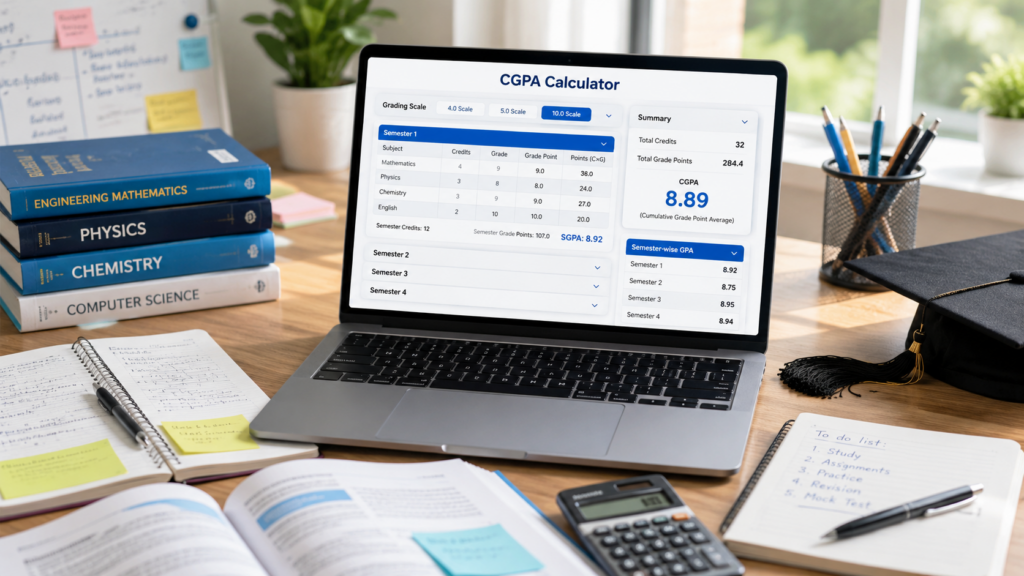
Our CGPA Calculator Online supports multiple grading systems, including 4.0, 5.0, and 10.0 scales. Simply enter your semester details, add the credits and grades for each subject, and the calculator will instantly determine your Cumulative Grade Point Average.
Unlike complicated spreadsheets or manual calculations, this tool automatically considers credit hours and calculates both semester GPAs and your overall CGPA, making it ideal for university and college students worldwide.
Table of Contents
What Is CGPA?
CGPA stands for Cumulative Grade Point Average. It is a numerical representation of your academic performance across all semesters of your course.
Rather than looking at marks obtained in individual subjects, CGPA combines your grades and credit hours to provide a single score that reflects your overall performance throughout your academic program.
Many universities use CGPA instead of percentages because it offers a standardized method of evaluating students across different courses and grading systems.
For example:
- Engineering colleges often use a 10-point grading system.
- Universities in the United States commonly use a 4-point GPA system.
- Some institutions follow a 5-point grading scale.
Regardless of the grading system, our Cumulative Grade Point Average Calculator allows you to calculate your result accurately.
Why Is CGPA Important?
Your CGPA is more than just a number. It plays a significant role throughout your academic and professional journey.
A good CGPA can help you:
- Qualify for scholarships and financial aid.
- Become eligible for internships.
- Meet campus placement requirements.
- Apply for postgraduate programs.
- Study abroad at international universities.
- Improve your chances of securing competitive job opportunities.
Many employers and universities use CGPA as one of the initial screening criteria before reviewing resumes or applications.
Keeping track of your CGPA every semester allows you to identify areas where you can improve before graduation.
What Does This CGPA Calculator Do?
Our calculator has been designed to simplify the entire calculation process.
Instead of manually applying formulas, you only need to enter your grades and subject credits.
The calculator can:
- Calculate CGPA across multiple semesters.
- Support 4.0, 5.0, and 10.0 grading scales.
- Add unlimited semesters.
- Add multiple subjects within each semester.
- Calculate semester GPA individually.
- Display cumulative CGPA instantly.
- Calculate total credits completed.
Everything happens automatically, reducing the chances of calculation errors.
Who Can Use This Calculator?
This calculator is useful for almost every student regardless of their course or university.
It is suitable for:
- Engineering students
- Medical students
- Commerce students
- Science students
- Arts students
- MBA students
- Diploma students
- International university students
- College students using credit-based grading systems
Whether your institution follows a 4-point GPA system or a 10-point CGPA system, this calculator works efficiently.
How Is CGPA Calculated?
The calculation is based on weighted grade points rather than simply averaging grades.
Each subject carries a certain number of credit hours. Subjects with higher credits contribute more to your final CGPA.
The basic formula is:
CGPA = Total Grade Points Earned ÷ Total Credit Hours
Where:
- Grade Points = Grade Value × Credits
- Total Grade Points = Sum of all subjects
- Total Credits = Sum of credits for all subjects
For example:
Suppose you studied four subjects.
| Subject | Credits | Grade Point |
|---|---|---|
| Mathematics | 4 | 9 |
| Physics | 3 | 8 |
| Chemistry | 3 | 9 |
| English | 2 | 10 |
Grade points earned:
- Mathematics = 4 × 9 = 36
- Physics = 3 × 8 = 24
- Chemistry = 3 × 9 = 27
- English = 2 × 10 = 20
Total Grade Points = 107
Total Credits = 12
CGPA = 107 ÷ 12 = 8.92
Our Calculate CGPA tool performs this calculation instantly, even if you have dozens of subjects spread across multiple semesters.
Features of Our CGPA Calculator
Not all online calculators are designed the same way. This calculator offers several useful features that make academic calculations much easier.
Supports Multiple Grading Systems
Whether your university follows a 4-point, 5-point, or 10-point grading scale, the calculator automatically adjusts grade values based on the selected scale.
Multiple Semester Support
You can add as many semesters as required.
This makes it suitable for:
- 4 Semester courses
- 6 Semester courses
- 8 Semester courses
- 10 Semester courses
- Master’s programs
Credit-Based Calculation
The calculator uses subject credits instead of simple averages, ensuring accurate results.
Semester-Wise GPA Breakdown
In addition to calculating your overall CGPA, the calculator also displays the GPA for each semester individually.
This allows you to monitor your academic improvement over time.
Instant Results
No manual calculations are required.
Results are displayed immediately after entering your grades and credits.
Mobile Friendly
The calculator works smoothly on:
- Desktop computers
- Laptops
- Tablets
- Smartphones
You can calculate your CGPA from anywhere without downloading an app.
Steps to Use This CGPA Calculator
Using the calculator is straightforward and takes only a few minutes.
Step 1: Select Your Grading Scale
Choose the grading system used by your university:
- 4.0 Scale
- 5.0 Scale
- 10.0 Scale
Step 2: Add Your Semester
Click Add Semester if you want to calculate CGPA across multiple semesters.
Step 3: Enter Subject Details
For each subject, provide:
- Subject name
- Credit hours
- Grade obtained
Step 4: Add More Subjects
Continue adding all the subjects you have completed in that semester.
Step 5: Repeat for Other Semesters
If your course has multiple semesters, repeat the same process for each one.
Step 6: Click “Calculate CGPA”
The calculator instantly displays:
- Overall CGPA
- Total Credits
- Semester-wise GPA breakdown
You can also reset everything and calculate again whenever required.

Why Use an Online CGPA Calculator Instead of Manual Calculation?
Manual calculations are time-consuming and often lead to mistakes, especially when multiple semesters and varying credit hours are involved.
A CGPA Calculator Online simplifies the process by handling all computations automatically. It eliminates arithmetic errors, saves time, and provides instant results. Since every subject’s credit weight is considered, the final CGPA is more accurate than a simple average.
Whether you’re checking your progress after each semester or preparing academic documents for admissions or placements, an online calculator provides a quick and reliable solution without requiring spreadsheets or complex formulas.
CGPA Calculation Examples
Understanding how CGPA is calculated becomes much easier when you look at practical examples. Below are examples based on different grading scales commonly used by universities.
Example 1: CGPA Calculation on a 10-Point Scale
Suppose you completed one semester with the following grades:
| Subject | Credits | Grade Point |
|---|---|---|
| Mathematics | 4 | 9 |
| Physics | 3 | 8 |
| Chemistry | 3 | 9 |
| English | 2 | 10 |
Step 1: Calculate Grade Points Earned
- Mathematics = 4 × 9 = 36
- Physics = 3 × 8 = 24
- Chemistry = 3 × 9 = 27
- English = 2 × 10 = 20
Total Grade Points = 107
Total Credits = 12
CGPA = 107 ÷ 12 = 8.92
Example 2: CGPA Across Multiple Semesters
Suppose your semester GPAs are:
| Semester | GPA | Credits |
|---|---|---|
| Semester 1 | 8.5 | 20 |
| Semester 2 | 8.9 | 22 |
| Semester 3 | 9.2 | 24 |
Weighted calculation:
(8.5 × 20) + (8.9 × 22) + (9.2 × 24)
= 170 + 195.8 + 220.8
= 586.6
Total Credits = 66
CGPA = 586.6 ÷ 66 = 8.89
This is exactly how our CGPA Calculator performs the calculation automatically.
Example 3: GPA on a 4.0 Scale
| Subject | Credits | Grade |
|---|---|---|
| Biology | 4 | A |
| Chemistry | 3 | B+ |
| English | 3 | A- |
After applying the corresponding grade points, the calculator determines the weighted GPA without requiring manual calculations.
This makes it an excellent GPA to CGPA Calculator for students studying in universities that follow international grading systems.
CGPA vs GPA vs SGPA vs Percentage
Many students confuse these academic terms. Here’s a quick comparison.
| Term | Meaning |
|---|---|
| GPA | Grade Point Average for one semester or term |
| SGPA | Semester Grade Point Average |
| CGPA | Overall average across all semesters |
| Percentage | Marks converted into percentage according to university rules |
In simple words:
- GPA measures one academic term.
- SGPA is essentially the GPA of a semester.
- CGPA combines every semester into one cumulative score.
- Percentage is a separate conversion that varies by university.
Always check your institution’s official conversion formula before converting CGPA into percentage.
Benefits of Maintaining a High CGPA
A strong CGPA can positively influence many stages of your academic and professional journey.
Some advantages include:
- Better campus placement opportunities.
- Eligibility for scholarships.
- Higher chances of admission into postgraduate courses.
- Increased opportunities for studying abroad.
- Competitive edge during internship applications.
- Stronger academic profile for government examinations.
Although CGPA is important, employers also value practical skills, internships, certifications, projects, and communication abilities.
Tips to Improve Your CGPA
Improving your CGPA doesn’t happen overnight, but consistent effort can make a noticeable difference.
Attend Classes Regularly
Regular attendance helps you understand concepts more effectively and reduces last-minute stress before examinations.
Focus on High-Credit Subjects
Subjects with more credit hours have a greater impact on your CGPA. Prioritize these courses while preparing for exams.
Create a Study Schedule
Breaking your syllabus into manageable daily goals makes studying less overwhelming and improves retention.
Revise Frequently
Instead of cramming before exams, review your notes every week. Regular revision helps reinforce concepts and improves long-term memory.
Practice Previous Year Papers
Solving past exam papers familiarizes you with question patterns and improves your confidence during examinations.
Seek Help Early
If you’re struggling with a topic, don’t wait until the final exam. Discuss concepts with professors, classmates, or tutors as soon as possible.
Common Mistakes Students Make While Calculating CGPA
Manual calculations often result in errors. Some of the most common mistakes include:
- Ignoring subject credit hours.
- Using incorrect grade point values.
- Averaging semester GPAs without considering credits.
- Mixing grading scales.
- Forgetting to include all completed subjects.
- Entering incorrect grades.
Using our CGPA Calculator Online eliminates these errors by performing weighted calculations automatically.
Frequently Asked Questions (FAQs)
Is this CGPA Calculator free?
Yes. The calculator is completely free to use without registration or subscription.
Does it support multiple grading systems?
Yes. It supports:
4.0 Scale
5.0 Scale
10.0 Scale
Can I calculate CGPA for multiple semesters?
Absolutely. You can add multiple semesters and calculate your cumulative result instantly.
Does this calculator consider credit hours?
Yes. Credit hours are included in every calculation to ensure accurate weighted results.
Can I use this calculator on my mobile phone?
Yes. The calculator is fully responsive and works on smartphones, tablets, laptops, and desktop computers.
Final Thoughts
Keeping track of your academic performance shouldn’t involve complicated formulas or lengthy spreadsheets. Our CGPA Calculator makes the entire process quick, accurate, and hassle-free.
Whether you’re checking your performance after each semester, preparing for higher studies, applying for scholarships, or simply monitoring your progress, this calculator helps you obtain reliable results within seconds.
By supporting multiple grading systems, weighted credit calculations, and unlimited semesters, it provides a practical solution for students from different universities and educational backgrounds.
Bookmark this page whenever you need to Calculate CGPA quickly and accurately.
References
The following resources provide additional information about grading systems and academic performance:
- UGC (University Grants Commission): https://www.ugc.gov.in
- AICTE (All India Council for Technical Education): https://www.aicte-india.org
- National Education Policy (NEP): https://www.education.gov.in
- Your university’s official academic handbook or examination regulations.
Disclaimer
This CGPA Calculator is intended for educational and informational purposes only. While every effort has been made to ensure accurate calculations, grading systems and credit policies differ across universities and institutions. The calculated CGPA should be considered an estimate unless verified using your institution’s official academic regulations. Always consult your university’s examination office or academic handbook for official CGPA calculations and transcript-related information.